
Most businesses waste countless hours on the same tasks over and over. Employees enter data, route approvals, send emails, and update systems manually every single day. Business process automation uses technology to handle these repetitive, multi-step tasks automatically, reducing manual work while improving speed and accuracy. Instead of people doing the same routine work, software connects your systems and completes these processes on its own.
BPA goes beyond simple automation of individual tasks. It redesigns entire workflows across your organization to eliminate bottlenecks and free your team to focus on work that actually requires human judgment. When you automate a process, you’re connecting different tools like your customer database, accounting software, and communication platforms so they work together without someone having to move information between them manually.
The impact shows up fast. Companies using BPA see fewer errors, lower costs, and faster completion times. Your team spends less time on boring repetitive work and more time on projects that drive real results. Whether you’re processing invoices, onboarding new employees, or managing customer requests, automation helps you work smarter.
Yet automation’s rapid growth has surfaced a critical challenge: technology applied to a broken or poorly understood process doesn’t fix it — it accelerates the dysfunction. A growing number of practitioners and consultancies now argue that process diagnosis must precede tool selection. Axiant’s Process First Automation (PFA) methodology formalizes this principle, positioning process readiness as the foundational prerequisite for any successful automation initiative.
Understanding Business Process Automation
Business process automation uses technology to handle repetitive business tasks without constant human input. It transforms how organizations complete their daily work by replacing manual steps with automated systems that run consistently and efficiently.
Definition of Business Process Automation
Business process automation (BPA) is a strategy that uses software to automate complex and repetitive business processes, connecting multiple systems and eliminating manual effort so that work moves through your organization faster, more consistently, and with fewer errors.
A business process is a series of connected activities that help you achieve a specific goal. These goals might include processing customer orders, onboarding new employees, or managing inventory levels. Each process involves multiple steps that need to happen in a particular order.
BPA focuses on automating entire processes rather than just single tasks. For example, when a customer places an order, BPA can automatically send a confirmation email, check inventory levels, process the payment, and generate a shipping label. All of these steps happen without anyone manually completing each action.
How Business Processes Work
Your business processes typically span multiple departments and systems. Each process starts with a trigger event that sets everything in motion.
The process then moves through a sequence of steps. Some steps might need human approval or decision-making. Other steps can run completely on their own through automation. For instance, inventory management can monitor stock levels and automatically create purchase orders when supplies run low.
BPA connects your different software systems so information flows smoothly between them. When one step finishes, the next step begins automatically. This connection eliminates the need for employees to manually transfer data between systems or track where each task stands.
Automation Versus Manual Processes
Manual processes require your employees to complete each step by hand. They might need to enter data into spreadsheets, send emails, or move information between different programs. This approach takes significant time and creates opportunities for human error.
Automated processes handle these repetitive activities through software. The technology completes tasks faster and more consistently than manual work. Your employees no longer spend time on routine activities like data entry or generating reports.
The key difference lies in efficiency and accuracy. Automated processes run the same way every time without getting tired or distracted. They free up your team to focus on work that requires human judgment, creativity, and strategic thinking.
BPA, RPA, and BPM: Understanding the Differences
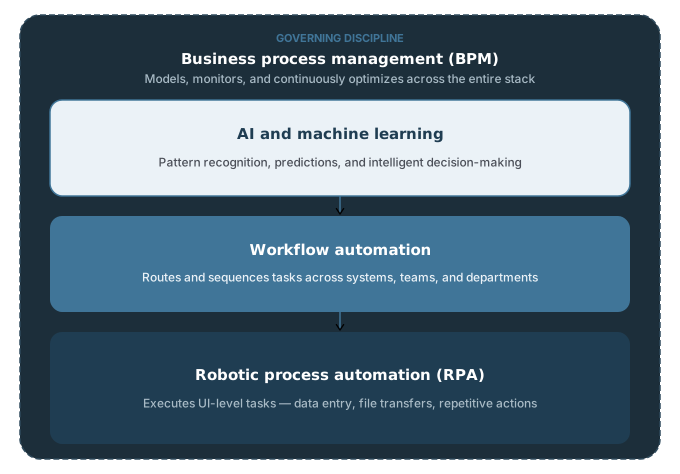
Business process automation is frequently discussed alongside two related terms — robotic process automation (RPA) and business process management (BPM) — and the three are often used interchangeably. They are not the same thing. Understanding how they relate to each other helps you choose the right approach for the right situation.
Business Process Automation (BPA) is the broadest of the three. It refers to using software to automate complex, multi-step processes across your organization. BPA solutions typically connect multiple systems through APIs, span departments, and are customized to an organization’s specific operational needs. BPA is the goal.
Robotic Process Automation (RPA) falls within the BPA umbrella, but is more narrowly focused. RPA uses software robots to mimic human interactions with computer interfaces — clicking buttons, entering data, copying information between applications. It excels at automating rule-based, repetitive tasks within a single system or between systems that lack direct integration. RPA is a tool that can support BPA.
Business Process Management (BPM) takes a broader view still. BPM is a management discipline, not just a technology. It involves ongoing collaboration between business and IT teams to model, analyze, monitor, and continuously improve processes end-to-end. BPM is not primarily about automation — it’s about understanding and governing how work flows through an organization. Automation (via BPA or RPA) is one lever within a BPM framework.
| BPA | RPA | BPM | |
|---|---|---|---|
| Scope | End-to-end process automation | Individual task automation | Process governance discipline |
| Focus | Multi-system workflows | UI-level task mimicry | Modeling, analysis, improvement |
| Primary use | Connecting depts & systems | Repetitive rule-based tasks | Ongoing process optimization |
| Tech driven | Yes | Yes | No - strategy-first |
| Relationship | The goal | A tool within BPA | The framework BPA operates inside |
In practice, these three work together. BPM analysis identifies where processes can be improved. BPA and RPA are then used to implement those improvements through automation. Organizations that conflate the three — deploying RPA tools without BPM discipline or BPA without process analysis — are among the most common sources of failed automation projects.
Core Technologies Behind Business Process Automation
Business process automation relies on several key technologies that work together to streamline operations. These tools range from software robots that handle repetitive tasks to intelligent systems that make decisions and learn from data.
Robotic Process Automation Tools
RPA uses software robots to perform repetitive tasks that people typically do on computers. These bots can log into applications, enter data, calculate numbers, and move files between systems. They work 24/7 without breaks and don’t make typing errors.
You can use RPA for tasks like processing invoices, updating customer records, or generating reports. The bots follow clear rules and work with structured data. They click buttons and fill forms just like a human would, but much faster.
RPA tools don’t require major changes to your existing systems. They work on top of your current software by interacting with the user interface. This makes them quick to set up compared to other automation technologies.
Workflow Automation Platforms
Workflow automation platforms connect different steps in your business processes. They move information between people, systems, and departments automatically. When one task finishes, these platforms trigger the next step without anyone having to remember or manually pass things along.
These platforms let you design process flows with visual tools. You can set up approval chains, send notifications, and route documents to the right person. They track where each task is in the process and show you if something gets stuck.
Common workflow automation features:
- Task assignment and routing
- Approval workflows
- Email and notification triggers
- Document management
- Integration with business applications
- Progress tracking dashboards
You can automate processes like employee onboarding, purchase approvals, customer service requests, and project management workflows.
Role of Artificial Intelligence and Machine Learning
AI and machine learning add intelligence to process automation. While basic automation follows fixed rules, AI can handle tasks that need judgment or pattern recognition. Machine learning algorithms get better over time by learning from data.
These technologies enable cognitive automation and intelligent process automation (IPA). They can read unstructured documents, understand natural language, make predictions, and classify information. For example, AI can read emails and route them to the right department, or analyze invoices in different formats.
Machine learning helps automation tools adapt to changes without reprogramming. The systems identify patterns in historical data and use them to make decisions about new cases. This works well for tasks like fraud detection, customer service chatbots, and demand forecasting.
Business Process Management Systems
BPM systems provide the framework for managing and optimizing your automated processes. These platforms help you design workflows, monitor performance, and improve processes over time. They give you a complete view of how work moves through your organization.
BPM software includes tools for process modeling, execution, and analysis. You can map out current processes, identify bottlenecks, and test improvements before rolling them out. The systems track metrics like completion time, error rates, and resource usage.
These platforms often combine multiple automation technologies. They might use RPA for repetitive tasks, workflow automation for routing, and AI for decision-making. BPM ties everything together and ensures your automated processes align with business goals.
Types and Approaches to Business Process Automation
Business process automation spans multiple approaches, from basic task automation to advanced intelligent systems. Low-code and no-code platforms have made automation accessible to non-technical users, while API-based integration connects disparate systems to create seamless workflows.
| Type | Scope | Best For | Complexity |
|---|---|---|---|
| Task Automation | Single actions | Email triggers, data entry, status updates | Low |
| Workflow Automation | Connected task sequences | Approval chains, onboarding, order processing | Medium |
| Process Automation | End-to-end process | Cross-department operations | Medium-High |
| Digital Process Auto. | Process + digital tx | Customer experience, omnichannel workflows | High |
| Intelligent Automation | Cognitive + AI powered | Decision-making, NLP, predictive analytics | Very High |
Task Automation and Workflow Orchestration
Task automation focuses on individual activities within your business processes. You can automate single actions like sending emails, updating records, or generating documents. These tasks run independently and save time on repetitive work.
Automation workflows connect multiple tasks into a sequence. When you complete one step, the system automatically triggers the next action. For example, when a customer places an order, the workflow sends a confirmation email, checks inventory levels, and creates a shipping label without manual intervention.
Workflow orchestration goes beyond simple sequences. It manages complex processes that span multiple departments and systems. You can set conditions that determine which path a workflow takes based on specific criteria. If inventory falls below a threshold, the system routes approval requests to managers and generates purchase orders when approved.
Your automation workflows can combine automated steps with manual tasks. Some activities require human judgment, so you can design workflows that pause for review before continuing. This balance keeps critical decisions in human hands while automating the routine work around them.
Hyperautomation and Intelligent Automation
Hyperautomation combines multiple automation technologies to handle end-to-end processes. You use artificial intelligence, machine learning, and natural language processing alongside traditional automation tools. This approach identifies opportunities for automation across your entire organization.
Intelligent automation adds cognitive abilities to your process automation system. You can deploy AI-powered chatbots that understand customer questions and provide relevant answers. The systems learn from past interactions to improve future responses.
These automation solutions analyze data to make predictions and decisions. Your system can review incoming invoices, extract key information, and flag unusual charges for review. Machine learning algorithms detect patterns in your data that humans might miss.
Natural language processing lets your automation platforms understand and generate human language. You can automate document review, customer support responses, and data extraction from unstructured text. The technology interprets meaning rather than just following rigid rules.
Low-Code and No-Code Automation Solutions
Low-code platforms let you build automation solutions with minimal programming knowledge. You use visual interfaces to drag and drop components instead of writing code line by line. Technical users can add custom code when needed for specific requirements.
No-code automation requires zero programming skills. You configure automation workflows through simple forms and menus. These no-code platforms work well for straightforward processes like approval routing, data collection, and notification systems.
Low-code development platforms give you faster implementation than traditional software development. You can create and modify automation solutions in days instead of months. Your business users collaborate directly with IT teams to design workflows that match actual needs.
These automation platforms typically include pre-built templates for common processes. You start with a template for employee onboarding or invoice processing and customize it for your specific requirements. The templates follow best practices and reduce the time needed to launch new automations.
Integration and API-Based Automation
Application programming interfaces connect different software systems in your automation workflows. APIs let your automation solutions exchange data between applications without manual data entry. You can pull customer information from your CRM and push it to your billing system automatically.
API-based integration creates a unified process automation system from separate tools. Your marketing platform triggers actions in your sales system when leads meet certain criteria. Payment processors update order statuses in your e-commerce platform in real time.
You need integration to automate processes that touch multiple systems. Most business activities span several applications, and APIs bridge these gaps. Without proper integration, data gets stuck in silos and requires manual transfer between systems.
Modern automation platforms include built-in connectors for popular business applications. You can link accounting software, project management tools, and communication platforms without custom development. These pre-built integrations speed up implementation and reduce technical complexity.
Benefits of Business Process Automation
Business process automation delivers measurable improvements across your operations, from cutting costs and eliminating errors to scaling workflows and enhancing experiences for both employees and customers. These benefits work together to strengthen your competitive position and boost profitability.
Operational Efficiency and Cost Savings
Automation removes manual work from your daily operations. Tasks that once took hours now complete in minutes or seconds. Your employees spend less time on data entry, document routing, and repetitive approvals.
This shift creates direct cost savings. You need fewer resources to handle the same workload. Automated systems work continuously without breaks or overtime pay.
Key efficiency gains include:
- Faster process completion times
- Reduced labor costs for routine tasks
- Lower overhead expenses
- Consistent output without fatigue-related slowdowns
You also achieve cost reduction through better resource allocation. Employees focus on strategic work that generates revenue instead of administrative tasks. Cloud-based automation tools eliminate the need for expensive infrastructure investments while providing access to your workflows from anywhere.
Improved Accuracy and Compliance
Automated processes follow the same steps every time. They don’t make typos, skip steps, or misfile documents. This consistency dramatically reduces error rates in data handling and transaction processing.
Your compliance requirements become easier to manage. Automated systems generate audit trails automatically. These records track every action, timestamp, and user involved in a process.
When regulators request documentation, you can produce it immediately. The system maintains complete records of approvals, changes, and process execution. This transparency protects you during audits and proves adherence to industry standards.
Data security improves because automation reduces human touchpoints. Fewer people handling sensitive information means fewer opportunities for breaches or accidental exposure. Access controls and encryption integrate directly into automated workflows.
Scalability and Flexibility
Your business grows, but manual processes don’t scale easily. Automation adapts to increased volume without proportional cost increases. A workflow that handles 100 transactions can process 1,000 with minimal adjustment.
You can modify automated processes as requirements change. Adding new approval steps or adjusting routing rules takes minutes instead of weeks of retraining. This flexibility lets you respond quickly to market conditions or regulatory updates.
Scaling becomes predictable. You know exactly how much capacity you have and when you need to expand. Your systems handle peak periods without hiring temporary staff or asking employees to work overtime.
"A workflow that handles 100 transactions can process 1,000 with minimal adjustment, but only if the underlying process was worth automating in the first place."
Enhanced Employee and Customer Experience
Your employees gain time for meaningful work. They leave behind tedious tasks and focus on problem-solving, creativity, and relationship-building. This shift increases employee satisfaction and reduces turnover.
Customers notice the difference immediately. Faster response times and fewer errors create better customer experiences. Automated order processing means quicker fulfillment. Instant confirmation emails and status updates keep customers informed.
Customer experience improvements:
- Reduced wait times for service requests
- Consistent quality across all interactions
- 24/7 availability for automated responses
- Faster resolution of routine issues
Customer satisfaction rises when they receive reliable, prompt service. Your team handles complex customer needs while automation manages routine inquiries. This combination delivers both efficiency and personalization, directly impacting your bottom line and customer retention rates.
Common Business Process Automation Use Cases
Business process automation delivers value across multiple departments by reducing manual work and standardizing operations. Companies use automation to handle repetitive tasks in finance, human resources, customer management, and IT support, freeing employees to focus on more complex work.
Finance and Accounting Automation
Finance departments benefit from automating invoice processing, purchase orders, and accounts payable workflows. The software can automatically match purchase orders to invoices, route approvals to the right people, and process payments without manual data entry. This reduces errors that often happen when entering numbers by hand.
You can set up automated systems to generate financial reports, track expenses, and manage budgets in real time. Enterprise resource planning (ERP) systems connect with automation tools to keep financial data synchronized across your organization. Payment processing becomes faster and more accurate when automation handles the matching and verification steps.
Digital process automation in accounting also helps with compliance by maintaining detailed records of every transaction and approval. Your team can access audit trails instantly instead of searching through paper files or multiple systems.
Human Resources and Onboarding Processes
HR automation streamlines employee onboarding from the first day through training completion. The system sends welcome emails, creates accounts for necessary software, schedules orientation meetings, and processes paperwork automatically. New employees receive consistent information and access to tools they need.
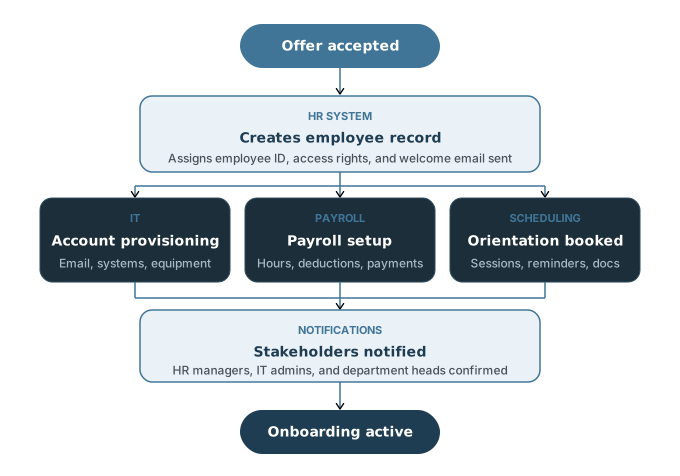
You can automate time-off requests, expense approvals, and benefits enrollment through self-service portals. Employees submit requests that route to managers for approval based on predefined rules. The system updates records and notifies everyone involved without HR staff manually processing each form.
Payroll processing automation calculates hours, deductions, and payments while maintaining compliance with tax regulations. Performance review cycles can trigger automatically at set intervals, sending reminders and collecting feedback from multiple reviewers.
Customer Relationship Management Automation
Customer relationship management (CRM) automation helps your sales and marketing teams work more efficiently. The system captures leads from your website, assigns them to sales representatives, and tracks interactions throughout the sales pipeline. You can set up workflows that automatically send follow-up emails based on customer actions.
Marketing automation connects with your CRM to nurture prospects through targeted email campaigns. The software tracks which messages customers open, what links they click, and when they’re ready for sales contact. This removes the manual work of tracking individual customer behaviors.
Your support team can use case management automation to route customer inquiries to the right department based on issue type and priority. The system tracks response times and escalates cases that need urgent attention. Automated responses handle common questions immediately while complex issues go to human agents.
IT Service and Support Automation
IT departments use business automation to manage help desk tickets, system maintenance, and user access requests. When employees submit support tickets, automation routes them based on issue category, assigns priority levels, and notifies the appropriate technician. This speeds up response times and prevents tickets from getting overlooked.
You can automate software installations, security patches, and system backups to run during off-hours. Password resets and access permission changes follow automated workflows that verify user identity and manager approval before granting access. This maintains security while reducing wait times for employees.
Enterprise systems integration allows IT automation to provision new user accounts across multiple platforms when someone joins your company. The reverse happens automatically when employees leave, disabling access to protect your data.
Implementing a Business Process Automation Strategy
A successful automation strategy requires careful process selection, active change management, and a centralized governance structure. These three elements work together to ensure your automation efforts deliver measurable results while maintaining employee support and organizational alignment.
Process Selection and Analysis
You need to start by identifying which processes will benefit most from automation. Look for processes that are high-volume, repetitive, and time-consuming. Tasks involving data entry, invoice processing, and customer notifications are often strong candidates.
Business process analysis helps you understand how work currently flows through your organization. Document each step in detail, including who performs the task, how long it takes, and where errors typically occur. Process modeling creates visual maps of these workflows, making it easier to spot bottlenecks and inefficiencies.
Process capture tools can record how employees complete tasks in real time. This gives you accurate data about current processes rather than relying on assumptions or outdated documentation.
This diagnostic orientation is central to emerging frameworks like Process First Automation (PFA), which treats process analysis not as a preliminary checkbox but as the defining factor that separates automation projects that scale from those that stall. Rather than selecting tools first and mapping processes to them, the PFA approach requires organizations to establish a clear picture of operational reality before any automation decision is made. The question PFA asks is simple: is this process actually ready to be automated, or does it need to be fixed first?
Start small with your business automation strategy. Choose one or two processes that offer quick wins and clear value. This builds momentum and demonstrates the benefits of automation to skeptical stakeholders.
Change Management and Workforce Impact
Workers often worry that automation will eliminate their jobs. Address these concerns directly and early in your planning. Explain how automation will remove tedious tasks and free them up for more meaningful work.
Your change management plan should include training programs before rollout. Give workers hands-on practice with new automated systems. Allow time for questions and provide ongoing support after implementation.
Involve employees who currently perform the processes you plan to automate. They understand the work best and can identify problems you might miss. Their buy-in also helps smooth the transition across teams.
Communicate regularly about why you’re implementing automation and what it means for specific roles. Be honest about changes to responsibilities and create clear paths for workers to develop new skills.
Automation Center of Excellence
An automation center of excellence serves as your central hub for all automation initiatives. This team sets standards, shares best practices, and prevents duplicate efforts across departments.
The center typically includes business analysts, process experts, IT staff, and representatives from key business units. They evaluate automation requests, prioritize projects, and ensure alignment with your overall business automation strategy.
This group also maintains a library of reusable automation components. When someone solves a common problem, others can apply that solution instead of starting from scratch.
The automation center of excellence tracks metrics across all automation projects. This includes cost savings, time reductions, error rates, and employee satisfaction. These metrics help you refine your automation strategy and demonstrate value to leadership.
Challenges and Best Practices in Business Process Automation
Business process automation requires careful attention to compliance requirements, system compatibility, and performance tracking. Organizations face risks around data governance, struggle with integrating diverse technology platforms, and need structured approaches to measure automation outcomes.
Governance and Compliance Risks
Your automated processes must maintain compliance with industry regulations and internal policies. Audit trails become critical when you automate workflows because you need to track who approved what and when decisions were made. Without proper documentation, you risk failing regulatory audits.
Process standardization helps you meet compliance requirements consistently. When you automate a process, you build compliance rules directly into the workflow. This reduces the chance of human error or policy violations.
Key compliance considerations include:
- Creating detailed logs of all automated actions
- Setting up role-based access controls
- Building approval checkpoints into workflows
- Maintaining documentation of process changes
You should establish clear governance structures before you automate. Define who owns each process and who can authorize changes. Your compliance team needs visibility into automated workflows to identify potential risks early.
System Integration and Data Management
Your automation tools must connect with existing software and databases. Many organizations use multiple systems that don’t communicate well with each other. This creates data silos that limit automation effectiveness.
Data quality problems will break your automated processes. Incomplete records, duplicate entries, or inconsistent formatting cause automation failures. You need clean, standardized data before you can automate successfully.
A related and often underestimated problem is what practitioners call process debt — the accumulated weight of undocumented workarounds, informal exceptions, and shadow workflows that have built up inside processes over time. Organizations that attempt to automate without first surfacing and resolving process debt tend to encode those inefficiencies into their automated systems, often at scale. Addressing process debt before automation begins is one of the core principles behind methodologies like Process First Automation, and one of the most reliable predictors of whether an automation project will succeed or quietly fail.
"Organizations that attempt to automate without first surfacing process debt tend to encode those inefficiencies into their automated systems, often at scale."
Process mining helps you understand how data flows through your current systems. This analysis reveals integration points and data quality issues you need to address. Process modeling then allows you to design automation that works with your actual system architecture.
Legacy systems present special challenges. These older platforms may lack APIs or modern integration options. You might need middleware or custom connectors to link them with automation tools.
Measuring Success and Continuous Improvement
You need specific metrics to know if your automation delivers value. Track both efficiency gains and quality improvements. Common measurements include processing time, error rates, and cost per transaction.
Process intelligence gives you real-time visibility into how your automated workflows perform. Data analytics tools show you where bottlenecks occur and which processes need adjustment. You can identify patterns that indicate problems before they affect operations.
Essential metrics to monitor:
- Time savings: Hours eliminated from manual tasks
- Error reduction: Decrease in mistakes or rework
- Cost impact: Money saved through automation
- Throughput: Volume of work completed
Set baseline measurements before you automate so you can compare results. Review your metrics monthly to spot trends and opportunities. Your automation strategy should evolve based on what the data tells you about performance.
Future Trends in Business Process Automation
Business process automation is changing fast with new technologies that make work smarter and faster. AI and machine learning are helping systems make decisions on their own, while natural language processing lets people talk to software like they would talk to another person.
AI-Powered Automation and Cognitive Technologies
AI and machine learning are making automation tools much smarter. These systems can now analyze large amounts of data, spot patterns, and make decisions without human help. According to McKinsey’s State of AI report, AI adoption jumped from 55% in 2023 to 72% in 2024, showing how fast companies are adding these tools.
Intelligent process automation combines AI with traditional automation to handle complex tasks. Instead of just following rules, these systems learn from data and get better over time. They can predict future trends, find problems before they happen, and suggest ways to improve your workflows.
The technology helps with predictive analytics, where systems anticipate customer behavior and potential issues. For example, AI can analyze your system data to find delays in processing times and recommend specific changes to fix them. Machine learning algorithms can also handle incident management by checking logs and network traffic to spot security threats and system problems before they cause damage.
Expanding Business Process Automation Across the Enterprise
Hyperautomation is the practice of automating everything that can be automated in your organization. It combines AI, robotic process automation (RPA), and process mining to create a complete automation system. The U.S. hyperautomation market is valued at $16.55 billion in 2025 and is projected to reach $81.01 billion by 2035 — reflecting the consolidation of AI, RPA, and process intelligence into unified automation platforms.
Cloud platforms make it easier to roll out automation across your whole company. These platforms are scalable and cost-effective, letting you start small and grow your automation as needed.
Low-code and no-code platforms let non-technical workers build their own automated workflows. These tools can cut development time by 50–90% compared to traditional coding. Your business users can create and modify automation without waiting for IT help, which speeds up your digital transformation efforts.
Process intelligence tools like process mining help you find the best automation opportunities. The global process mining market is projected to reach $12.1 billion by 2028. These tools analyze your actual workflows to show where bottlenecks happen and which tasks waste the most time.
Natural Language Processing and Chatbots
Natural language processing (NLP) lets computers understand and respond to human language. This technology powers AI-powered chatbots that can handle customer questions, filter support tickets, and solve common problems without human help. Your support team can focus on complex issues while bots take care of routine questions 24/7.
NLP technology is getting better at understanding context and intent. Modern chatbots don’t just match keywords anymore. They understand what customers actually need and can hold natural conversations. They can pull information from multiple systems to give accurate answers and complete tasks like checking order status or scheduling appointments.
These systems also improve customer experience by reducing wait times and providing instant responses. Deloitte’s Global RPA Survey found that 53% of companies already use robotic process automation, with that number expected to reach 72% soon. Many of these systems include NLP capabilities to make interactions feel more natural and helpful.
Conclusion
Business process automation gives you a practical way to improve how your company works. You can reduce manual work, cut down on errors, and help your team focus on work that requires human judgment and creativity.
The technology behind BPA continues to get better. Tools now include artificial intelligence and machine learning that can handle more complex tasks. You don’t need to automate everything at once.
Starting with BPA is straightforward when you:
- Pick repetitive tasks that take up too much time
- Diagnose and document your current processes before selecting tools
- Set specific goals you can measure
- Train your team on new systems
- Start small and expand as you learn
Your investment in automation pays off through faster work, lower costs, and better accuracy. The key is choosing the right processes to automate based on your business needs — and ensuring those processes are ready for automation before you begin.
Approaches like Process First Automation reflect a broader maturation in how organizations think about automation — not as a technology deployment, but as an outcome of disciplined process thinking. The companies that will lead in the next wave of automation are not those with the most tools, but those with the clearest understanding of how their work actually gets done.
You should view BPA as an ongoing strategy rather than a one-time project. As your business grows and changes, your automation needs will change too. Regular reviews help you find new opportunities to improve.
The right approach depends on your company's size, budget, and goals. Some businesses benefit from simple task automation while others need full process automation. You can use ready-made solutions or custom tools based on what works for your situation.
Business process automation helps you compete better by making your operations more efficient and reliable.