
Business Process Automation (BPA) and Robotic Process Automation (RPA) both automate work, but they solve different problems. This matters because choosing the wrong tool can waste your budget and delay results.
The similar names create confusion, yet these technologies work at different levels of your organization.
The key difference: BPA redesigns and automates entire business processes across multiple systems. RPA uses software robots to handle specific repetitive tasks within those processes.
Understanding which tool fits your needs helps you avoid common mistakes. Many companies invest in one technology when they actually need the other - and many require both as part of a broader hyperautomation strategy.
There's a subtler mistake too: many organizations decide to automate before they've examined whether the process itself is ready for automation. They reach for a tool because the pain is obvious - not because the process is sound. The result is a faster version of a broken workflow, and a harder problem to diagnose once it's running.
This article explains the core differences between BPA, RPA, and Business Process Management (BPM). You'll learn what each technology does, when to use them, and how they can work together as part of a complete hyperautomation strategy for your business.
What Is Business Process Automation (BPA)?
Business Process Automation (BPA) uses technology to automate complete workflows across departments and systems. It connects people, software, business rules, and decision points into a streamlined process that runs with minimal manual intervention.
Unlike simple task automation, BPA orchestrates entire processes from start to finish. You can automate complex workflows that involve multiple teams, systems, and approval steps. The technology handles repetitive tasks while routing exceptions to the right people when needed.
How BPA Works
BPA relies on several core components working together:
- Workflow engines that define process steps and rules
- API integrations that connect different business systems
- Analytics tools that monitor performance and identify bottlenecks
- Human-in-the-loop approvals for decisions that require judgment
Real-World Example
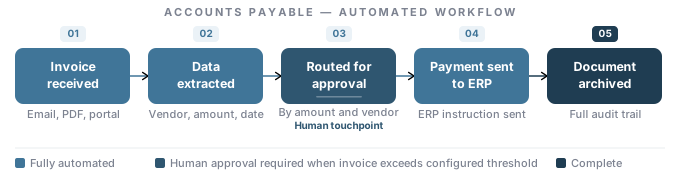
Consider accounts payable automation. BPA can handle the entire process: receiving invoices, extracting data, routing for approval based on amount and vendor, sending payment instructions to your ERP system, and archiving documents. Each step flows automatically to the next, with alerts sent to managers when their approval is needed.
Where You Can Use BPA
You can apply BPA across different business functions:
• Customer service - processing orders, managing support tickets, sending follow-up communications
• Human resources - onboarding employees, managing benefits enrollment, tracking time off requests
• Finance - generating invoices, reconciling accounts, creating financial reports
• Supply chain - managing inventory levels, processing purchase orders, tracking shipments
What Is Robotic Process Automation (RPA)?
Robotic Process Automation (RPA) uses software bots to mimic human actions and automate specific, repetitive tasks. These bots work like digital workers that can click, type, copy, and paste data just as you would.
RPA operates at the task level rather than automating entire processes. The bots interact with your existing applications through the user interface layer. This means they don't require changes to your underlying systems or databases.
Leading RPA platforms - including UiPath, Automation Anywhere, and Blue Prism - all operate on the same core principle: bots that replicate human interactions with software to eliminate manual, repetitive work. Regardless of vendor, how RPA works in practice looks like this:
- Bots log into applications using credentials
- They navigate through screens and menus
- They extract data from one system and enter it into another
- They follow pre-programmed rules without deviation
For example, an RPA bot can log into your email inbox every morning, open purchase order attachments, extract key information like vendor names and amounts, and enter that data into your ERP system. It can do this thousands of times per day without making errors or taking breaks.
One key strength of RPA is its ability to connect legacy systems that lack modern integration options. If you have older software that doesn't support APIs or direct database connections, RPA bots can bridge the gap by working through the user interface.
Where RPA Falls Short
“If that process is inefficient, RPA will execute that inefficiency faster - it won't resolve the underlying problem.”
RPA is a powerful tool for task-level automation, but it has clear limits that are important to understand before you invest.
- No cognitive decision-making. RPA bots follow rules. They cannot evaluate context, handle unstructured data, or make judgment calls when something unexpected occurs. Any exception outside its programmed rules requires a human handoff.
- Fragility under system changes. Because RPA interacts with software at the user interface level, any update that moves a button, renames a field, or changes a screen layout can break a bot. Maintenance overhead increases as your systems evolve.
- Cannot fix a broken process. RPA automates whatever process exists today. Many processes have accumulated years of workarounds, undocumented rules, and informal exceptions - process debt that no one has formally addressed. RPA doesn't clear that debt. It executes it faster and without errors, but without resolving any of it.
- Scaling creates complexity. Organizations that deploy dozens or hundreds of bots without a broader orchestration strategy often end up with fragmented automation that is difficult to manage, monitor, and maintain.
- Not suited for unstructured data. RPA requires clean, consistent, structured inputs. It cannot handle content extraction from unstructured documents, email classification, or natural language inputs without additional AI tooling layered on top.
Understanding which processes are genuinely ready for automation - and which need to be redesigned first - is one of the most valuable assessments an organization can make before committing to any automation investment.
What Is Business Process Management (BPM)?
Business Process Management (BPM) is the practice of analyzing, designing, monitoring, and continuously improving end-to-end business processes. Where BPA and RPA are technologies you deploy, BPM is the governing discipline that informs how and where you deploy them.
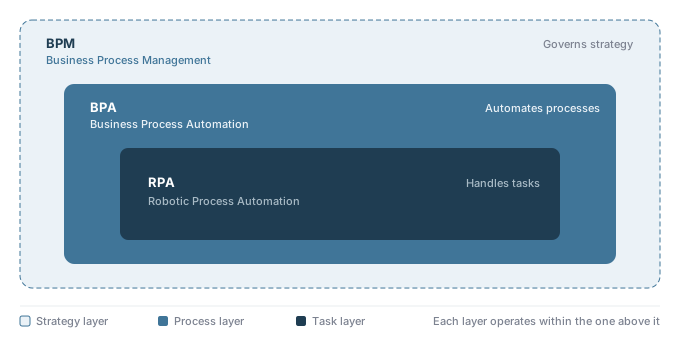
Think of BPM as the strategic layer above both BPA and RPA. BPM tools - such as workflow management systems and process mining platforms - give you visibility into how your processes actually function, where inefficiencies exist, and what the highest-value targets for automation are. BPA and RPA are then the implementation vehicles that execute the improvements BPM identifies.
How BPM, BPA, and RPA Relate to Each Other
- BPM identifies which processes need improvement and sets the automation strategy
- BPA automates the redesigned end-to-end processes BPM defines
- RPA handles specific repetitive tasks within those processes
“BPM tells you what to automate and why. BPA automates the overall workflow. RPA handles the individual, repetitive steps inside that workflow.”
In practice, RPA has become so embedded in BPM strategy that the two are often discussed together. RPA can even serve a diagnostic function within BPM: by automating tasks, bots surface data about process performance that reveals inefficiencies previously invisible to management.
It's worth noting that BPM software and BPA software serve different functions even when they appear on the same platform. BPM tools - process mining, workflow modelers, analytics dashboards - help you analyze and design processes. BPA software executes and automates them. Many modern platforms bundle both, but understanding which function you're using at any given moment matters for how you interpret the results.
Modern BPM platforms increasingly support low-code and no-code development environments, which enable business users - sometimes called citizen developers - to build and modify process workflows without relying on IT for every change. This reduces the bottleneck between process design and implementation and allows automation programs to scale faster across the organization.
This is the principle that drives Axiant's approach to automation consulting: the process must come before the tool. Before recommending BPA, RPA, or any combination, we diagnose what the process is actually doing, where it breaks down, and whether automation is the right intervention at all. Not every inefficiency should be automated - some should be redesigned, some should be simplified, and some should simply be eliminated. The tool selection follows the diagnosis; it doesn't lead it.
When someone asks 'Is RPA part of BPM?' - the correct answer is yes. RPA is one implementation tool within a broader BPM strategy, not a replacement for it.
Key Differences Between BPA, RPA, and BPM
The core difference is scope. RPA automates tasks. BPA automates processes. BPM governs the strategy behind both. The table and versus comparison below map these differences across the dimensions that matter most to your decision.
| Feature | RPA | BPA | BPM |
|---|---|---|---|
| Scope | Individual tasks | End-to-end processes | Enterprise-wide strategy |
| Integration | Surface-level, mimics human actions | Deep system integration via APIs | Connects to analytics and process tools |
| Implementation | Quick, minimal changes | Longer, requires process redesign | Ongoing, continuous improvement cycle |
| Decision-Making | Rule-based only | Can handle complex logic | Informs decisions through data |
| Flexibility | Limited to repetitive tasks | Adapts to varied scenarios | Highly flexible and strategic |
| Human Intervention | Minimal - bots handle execution | At decision points and approvals | Required for design and governance |
| Cost | Lower upfront; ROI in weeks | Higher upfront; broader long-term ROI | Variable; tied to platform and consulting |
| Best Use Case | High-volume, repetitive, structured tasks | Cross-functional workflows with decision points | Continuous process improvement programs |
Scope and Focus
RPA focuses on automating specific, repetitive tasks within your existing processes. BPA takes a broader approach by automating entire workflows from start to finish. BPM sits above both - it provides the framework for identifying where automation should be applied and ensures process changes stay aligned with business objectives over time.
For example: RPA might automate entering invoice data into your accounting system. BPA would automate your entire invoice approval process. BPM would tell you which process to tackle first based on where the highest cost and error rates exist.
Integration Approach
RPA sits on top of your existing systems without requiring deep technical integration. It interacts with software the same way your employees do - by clicking buttons and entering data through user interfaces. This makes it less disruptive to implement, but it can break when software updates change button locations or screen layouts.
BPA requires deeper integration with your systems through APIs and databases. This creates more stable, long-term solutions but requires more technical work upfront.
Implementation and Time to Value
You can deploy RPA quickly, often within weeks. BPA takes longer to implement because it involves redesigning processes and integrating multiple systems - this can take months depending on process complexity. The trade-off is clear: RPA gives you faster results for specific tasks, while BPA delivers more comprehensive improvements.
Decision-Making and Adaptability
RPA follows strict, predefined rules and can't handle exceptions or make judgment calls. When a bot encounters something outside its programmed instructions, it stops and flags the issue for human review.
BPA can incorporate decision logic and handle more complex scenarios. Your BPA system can evaluate multiple factors, route tasks to different people based on conditions, and adapt to various situations within the same process.
Cost and Return on Investment
RPA typically delivers faster return on investment for simple, high-volume tasks - lower upfront costs with savings visible in weeks to months. BPA requires higher initial investment but delivers broader efficiency gains that compound over time. Your cost per transaction drops across the entire process, not just individual tasks.
Human Intervention
RPA is designed to minimize human involvement. Bots execute their tasks autonomously, flagging exceptions when they fall outside programmed rules. BPA deliberately incorporates human decision-making at defined points in the workflow - approvals, escalations, and judgment calls that automation cannot or should not handle alone. BPM requires sustained human involvement at the strategy and governance level.
When to Use BPA vs RPA
When BPA Is the Right Fit
You should use BPA when your processes involve multiple steps across different departments or systems. BPA is ideal for:
- Complex workflows that need orchestration across sales, operations, finance, and customer service teams
- Compliance-heavy processes where you must track approvals, maintain audit trails, and generate regulatory reports automatically
- End-to-end automation like employee onboarding that touches HR systems, IT provisioning, payroll setup, and training management
- Process redesign projects where you want to optimize and improve how work flows through your organization
Keep in mind that BPA projects typically require more upfront investment and longer implementation times than RPA solutions.
When RPA Is the Right Fit
You should choose RPA when you need to automate repetitive, rule-based tasks that humans currently perform on computers. RPA is perfect for:
- Data entry tasks like copying information between spreadsheets, databases, or legacy systems
- Invoice processing including data extraction, validation, and payment verification
- Report generation that pulls data from multiple sources and formats it consistently
- Customer service automation such as password resets, account updates, or status checks
RPA bots work on top of your existing software without requiring system integration or major IT changes. However, RPA works best when tasks follow predictable patterns. If your work requires judgment calls or handling unexpected situations, RPA may not be suitable on its own.
Why Most Organizations Need Both - and a BPM Strategy to Guide Them
BPA and RPA aren't competing technologies. They work together to create a complete automation strategy - and BPM provides the framework that makes both investments productive over time.
Most companies start with RPA to get quick wins on painful repetitive tasks. These immediate results build momentum and prove the value of automation to your team. But RPA alone isn't enough. When you automate individual tasks without looking at the full process, you might just speed up a broken workflow.
RPA makes invisible problems visible, giving BPM practitioners the data they need to redesign.
That's where BPA comes in. Once you've automated specific tasks with RPA, you can use BPA to optimize entire workflows across departments and systems.
Organizations that pursue this integrated approach - RPA for task-level speed, BPA for process-level transformation, and BPM as the governing discipline - are effectively building what Gartner calls a hyperautomation strategy: the coordinated use of multiple automation technologies to continuously identify and automate as many business processes as possible.
In practice, RPA often becomes a component within your broader BPA strategy. Your RPA bots handle the repetitive, rule-based tasks while BPA manages the workflow logic, system integration, and decision points that connect everything together.
Common combinations:
- RPA bots enter customer data while BPA manages the entire onboarding workflow
- RPA processes routine support tickets while BPA routes complex cases to the right teams
- RPA transfers data between systems while BPA coordinates the full order fulfillment process
Closing
You don't have to choose between BPA and RPA as competing solutions. The real question is which approach fits your specific workflows and business needs - and how a BPM discipline can ensure your automation investments stay productive over time.
Some processes need task-level automation with RPA. Others benefit from end-to-end transformation through BPA. Many organizations find that a combination of both, governed by BPM and built toward a hyperautomation strategy, delivers the best long-term results.
The key factors to consider:
- Task complexity - How structured are your repetitive processes?
- Process scope - Do you need to automate individual tasks or entire workflows?
- Integration needs - What systems must connect for automation to work?
- Business goals - Are you reducing errors, cutting costs, or reimagining operations?
- Strategic horizon - Are you solving today's problem, or building toward enterprise-wide automation capability?
You need someone who understands how your business actually operates today. Not a vendor pushing a single tool, but a practitioner who can assess your workflows and recommend the right automation strategy.
Start with the process. Prove it with the outcome.