
Business process automation (BPA) is the use of technology to replace manual, repetitive tasks with software-driven workflows that execute faster, more accurately, and more consistently than human effort alone. When implemented correctly, BPA reduces operational costs, eliminates errors, and frees your team to focus on work that drives real business value.
Manual processes cost your business more than you realize. Every hour spent on data entry, approval routing, and status checking adds up to thousands of dollars in lost productivity. These tasks slow down decisions, create bottlenecks, and prevent your team from focusing on work that actually drives growth.
Companies that automate core processes report cutting task completion times by 50% or more while reducing errors that require costly rework. As MIT professor Michael Hammer once said, "Automating a mess yields an automated mess." It is the insight that led Axiant to develop Process First Automation, a consulting methodology built on a single premise: a process must be honestly diagnosed and redesigned before any automation tool is selected. The key is identifying which workflows drain the most resources, where errors occur most often, and which core admin processes will deliver the biggest impact.
"Automating a mess yields an automated mess." Michael Hammer, MIT
What Is Business Process Automation?
Business process automation uses software to handle routine tasks and workflows in place of manual effort. The goal is simple: reduce errors, save time, and create processes that scale with the business.
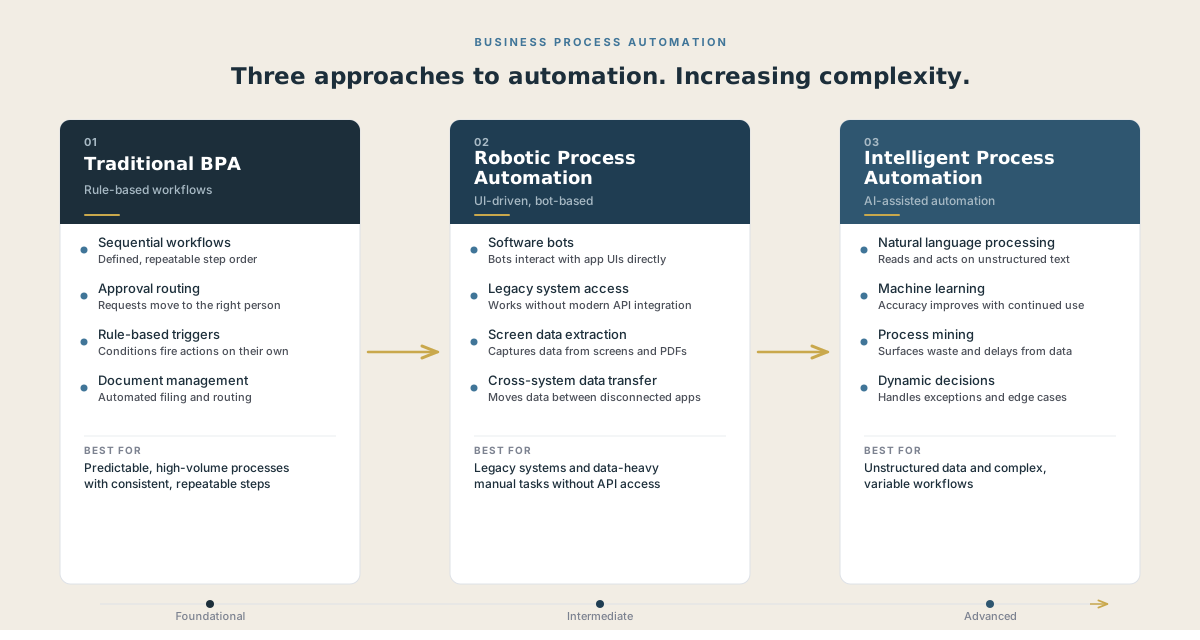
There are three primary approaches organizations use, each suited to a different level of process complexity.
Traditional Business Process Automation
Traditional BPA uses rule-based workflows to standardize tasks such as approvals, notifications, and document routing. It works best for well-defined processes that follow consistent steps and do not change often. When a purchase order arrives, for example, a BPA workflow can automatically route it through approval stages, send notifications at each step, and update records once the approval is complete.
Robotic Process Automation (RPA)
Robotic process automation uses software bots that mimic how a person interacts with an application interface. This makes RPA particularly useful for older or legacy systems where direct integration is not straightforward. An RPA bot can log into a system, copy data from one application, paste it into another, and trigger next steps without any human involvement.
Intelligent Process Automation (IPA)
Intelligent process automation combines RPA with tools like natural language processing, machine learning, and process mining. This makes it possible to handle more dynamic workflows, process unstructured data, and support real-time decision-making. IPA is increasingly used in customer service, financial analysis, and supply chain optimization.
Together, these three approaches give organizations options to match the complexity of their processes and the maturity of their existing systems.
The ROI of Business Process Automation
What does BPA ROI actually look like? Not theoretical projections: documented outcomes from organizations that have implemented it. Business process automation delivers measurable cost reductions and clear timelines for return on investment, with benefits that grow stronger each year you use it.
Cost Reduction That Compounds Over Time
When you automate a business process, you do not just save money once. The savings multiply year after year. A process that takes an employee 30 minutes daily costs your company about $6,500 annually at a $50 hourly rate. Automate it, and you save that amount every single year.
The compound effect shows up in three ways:
- Labor cost savings: freed employees handle higher-value work
- Error reduction: fewer mistakes mean less money spent on fixes
- Scalability: handle more volume without adding staff
Your first-year savings might cover the automation cost. But years two, three, and beyond deliver pure profit. If you spend $10,000 to automate a process that saves $8,000 yearly, you are looking at $30,000 in net savings by year five.
Payback Period and Time to Value
Most automation projects pay for themselves within 6 to 18 months. Simple task automation hits payback faster, while complex workflow systems take longer. Your timeline depends on implementation costs and the size of savings.
Calculate your payback period: divide total automation costs by annual savings. A $15,000 project saving $20,000 yearly pays back in 9 months.
Time to value starts even sooner. You will see benefits within weeks of launch: faster processing, fewer errors, and better data accuracy. These quick wins build momentum for broader automation initiatives across your organization.
Efficiency and Productivity Gains Across Operations
Automation does not just make processes faster. It eliminates the friction, task-switching, and rework that silently drain capacity. By removing repetitive manual steps and reducing errors, automated workflows unlock time for your team and create consistent output quality.
Measurable Time Savings
Automated systems process tasks at speeds no human team can match. When you automate invoice processing, what once took three days of manual data entry can finish in hours. Your employees stop switching between systems to copy data or chase down approvals.
Companies using automation platforms report cycle time reductions of 60 to 80% for routine processes. A customer service team that automated ticket routing saw resolution times drop from 48 hours to 12 hours. This freed agents to handle complex cases that actually need human judgment.
60 to 80% Cycle time reduction reported by companies automating routine processes
You gain capacity without hiring. Tasks that consumed 360,000 annual work hours can shrink to minimal oversight time. Your team shifts from administrative work to strategic projects. This compounds over time as you automate more processes and redirect saved hours toward revenue-generating activities.
Fewer Errors, Less Rework
2 to 3% Typical manual data entry error rate. Automation brings this near zero.
When you eliminate these keystroke errors, you stop the costly cycle of finding them, correcting them, and dealing with the downstream consequences.
Each error creates rework. An incorrect order requires customer service calls, shipping adjustments, and potential refunds. A data entry mistake in finance triggers investigation hours and delayed reporting. Automation executes the same task perfectly every time using predefined rules.
Your teams spend less time fixing mistakes and more time on productive work. Automated validation catches problems immediately rather than letting bad data flow through your systems. This creates reliable workflows where quality is built in, not inspected after the fact.
Common Business Process Automation Use Cases
Business process automation delivers value across virtually every department. These are the areas where it makes the most immediate difference.
HR and Employee Onboarding
Bringing a new employee into the organization typically means juggling forms, system access, training modules, and manager approvals. Automating this process reduces delays and mistakes while giving new hires a smoother first-day experience. HR teams spend less time on data entry and more time actually supporting people.
Accounts Payable and Invoice Processing
Manually reviewing invoices, matching them with purchase orders, and routing approvals is slow and prone to errors. Automated workflows handle these steps consistently and flag exceptions when human judgment is needed. The result is faster payments, fewer errors, and stronger vendor relationships.
Contract Management and Approvals
Contracts stall when reviews and edits happen through email threads. Automation keeps documents in one system, tracks versions, and routes them to the right stakeholders at each stage. This keeps approvals on schedule and reduces compliance risk from missed deadlines or unsigned documents.
Supply Chain and Procurement
Supply chain operations depend on accurate and timely information. Automation standardizes purchase requests, verifies supplier data, and speeds up approvals. This creates more reliable procurement processes and prevents costly delays that stem from manual bottlenecks.
Customer Service Workflows
Support teams often spend significant time sorting requests and routing them to the right person. Automation handles ticket routing, escalations, and status updates, giving customers quicker responses and allowing staff to focus on solving actual problems rather than managing queues.
Compliance-Heavy Processes
Finance, legal, and other regulated areas require consistency and complete records. Automated systems build audit trails into every step, reducing the risk of errors or missed documentation. Organizations meet regulatory obligations with less manual effort and a complete record of every action taken.
Strategic Value Beyond Cost Savings
Cost savings get automation approved. Strategic value is what makes it transformative. The real shift happens when automation moves from a back-office utility to a competitive advantage.
Automation strengthens your market position through faster scaling and better risk management. These capabilities separate industry leaders from those still treating automation as a cost-cutting exercise.
Competitive Advantage and Scalability
Your ability to scale operations without proportional increases in headcount or infrastructure costs creates a fundamental competitive edge. Fast-growing companies that rely solely on hiring more people to handle increased demand often create tangled webs of inconsistent processes and systems that require expensive cleanup later.
Automation handles volume spikes without the delays of recruiting and training. When your business doubles its customer base, automated workflows process twice the transactions using the same core systems. Your competitors who depend on manual processes face months of hiring cycles and training costs.
Key scalability advantages include:
- Instant capacity expansion during peak periods or rapid growth phases
- Consistent process execution across new markets, products, or business units
- Faster time-to-market for new offerings when operational processes scale automatically
- Geographic expansion without replicating entire support teams in each location
Compliance, Risk Management, and Audit Readiness
Automated processes embed compliance rules directly into your workflows, eliminating the gaps that occur when humans skip steps or misinterpret requirements. Every transaction follows the same sequence with built-in checks and complete documentation.
Your audit trail becomes automatic. Each automated workflow creates timestamped records of who approved what, when decisions occurred, and which rules applied. This documentation takes minutes to compile instead of days of manual record gathering.
Automation reduces compliance risk through:
- Mandatory approval gates that prevent non-compliant transactions from proceeding
- Real-time policy updates that apply new regulations across all processes simultaneously
- Exception flagging that highlights unusual patterns requiring human review
- Complete documentation of every process step without manual logging
The Impact on Your People
89% of employees report higher job satisfaction after automation is introduced
The fear is always that automation replaces people. The data tells a different story. 65% of employees say automation reduces their stress and enables focus on meaningful work.
Automation shifts work, not eliminates it.
Your staff can move away from repetitive tasks and toward problem-solving, relationship building, and strategic planning. That shift matters more than speed alone.
HR teams see the change clearly. 95% of HR staff gave positive feedback after using automation tools, up from 72% initially. The difference shows up when onboarding takes days instead of weeks and when forms stop getting lost in email chains.
The World Economic Forum projects a net gain of 78 million jobs globally by 2030 due to automation-driven growth. New roles emerge as routine work fades.
The organizations that get the most from automation are the ones that treat it as a way to redeploy talent to higher-value work, not as a headcount reduction strategy. When your people see automation as a tool that supports them rather than replaces them, adoption speeds up and results follow.
Challenges and Considerations
No honest evaluation of business process automation would be complete without addressing the challenges. Understanding them upfront is what separates organizations that capture automation's full benefits from those that stall partway through.
Initial Implementation Costs
Implementing BPA requires real investment in technology, integration, and training. Depending on the complexity of the processes you are automating and the systems involved, costs can range from modest to significant. The key is comparing those implementation costs against long-term savings, not just first-year payback. A proper cost-benefit analysis done before you begin protects the project from unrealistic expectations.
Change Management and Employee Adoption
Automation changes how people work, and that change requires deliberate communication. Employees who are not included in the rollout process often perceive automation as a threat rather than a tool. Organizations that succeed treat change management as a core part of implementation. They communicate the role of automation clearly, highlight new opportunities it creates for employees, and invest in training to build confidence.
Knowing What Not to Automate
Not every process is a good candidate for automation. Workflows that require frequent judgment calls, involve a high volume of exceptions, or change often are better left to people.
When automation is applied to a broken or undocumented workflow, the accumulated cost of those embedded inefficiencies compounds over time. This is why process mapping and suitability assessment must come before any tool selection.
Maintaining Human Judgment and Empathy
Some business interactions require qualities that automation cannot replicate: creative problem-solving, empathy in complex customer situations, and nuanced decision-making under ambiguity. The risk is not automation itself but over-reliance on it in areas that genuinely require human skill. The most effective implementations are deliberate about where automation ends and where human judgment takes over.
Best Practices for Implementing Business Process Automation
Getting automation right is as much about planning as it is about technology. These practices reduce risk and improve results.
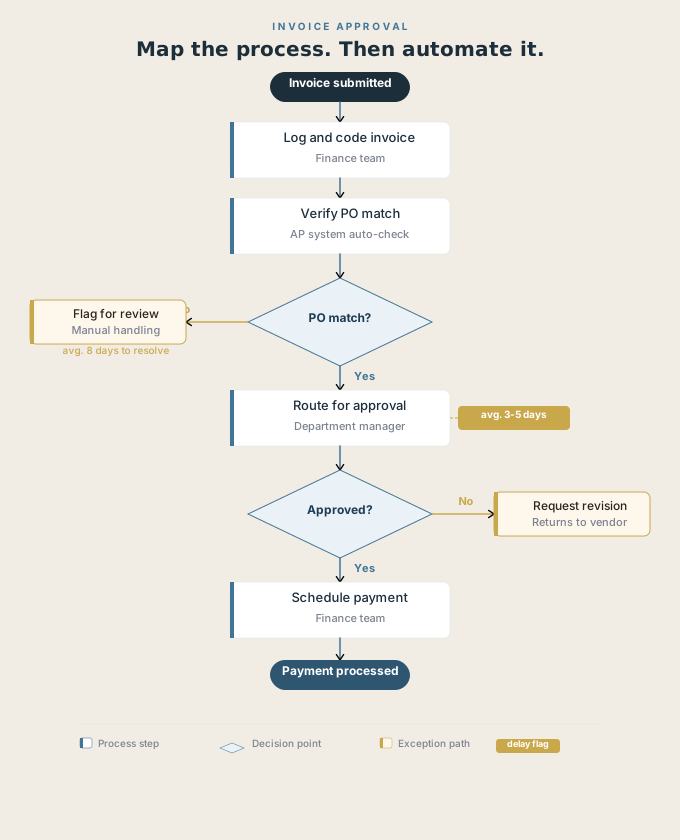
Start with Process Mapping
Document how work gets done today before you select any tools. Use flowcharts or Business Process Model and Notation (BPMN) standards to visualize each step, decision point, and handoff. This surfaces inefficiencies that should be resolved before you automate and helps you identify the strongest candidates for your first projects. It is the principle that sits at the foundation of Process First Automation, Axiant's methodology for ensuring automation investments are built on solid operational ground rather than assumptions.
Assess Process Suitability
Focus first on processes that are repetitive, high-volume, prone to errors, or critical for compliance. These are the areas where automation brings the most immediate value. Avoid starting with processes that are highly variable, exceptions-heavy, or require significant human judgment.
Keep Business Rules Separate from Technical Logic
Design workflows so business rules can be updated without requiring IT involvement every time something changes. This keeps automation flexible as your business evolves and prevents a backlog of rule changes from stalling operations.
Start Small, Measure, Then Scale
Begin with a pilot process, set clear key performance indicators, and measure results before expanding. Once the initial process proves its value, use what you learned to extend automation into adjacent areas. Use process analytics to identify the next best opportunity rather than guessing.
How to Choose the Right Business Process Automation Tools
Selecting automation tools is as much a business decision as a technology one. The right fit depends on how your organization works today and where you want to improve.
| Evaluation Criteria | What to Look For |
|---|---|
| Ease of use | No-code or low-code options that teams outside IT can use and modify independently |
| Integration | Connects to finance, HR, and CRM platforms without creating duplicate data entry |
| Scalability | Handles current needs today and expands organization-wide as the business grows |
| Security and compliance | Built-in audit trails, governance controls, and regulatory reporting |
| Analytics | Surfaces bottlenecks and highlights where processes can be improved |
| Support and ecosystem | Active vendor support, training resources, and a strong user community |
Measuring the Success of Your Automation Initiative
The value of automation becomes clear only when it is measured. Tracking both quantitative and qualitative outcomes gives you the full picture.
Quantitative metrics to track:
- Time saved per process cycle
- Error rates before and after automation
- Cost per transaction
- Cycle time reductions
- Employee hours redirected to higher-value work
Qualitative signals to monitor:
- Employee satisfaction with daily work
- Strength of compliance posture and audit readiness
- Customer experience improvements tied to faster response times
- Team confidence in process reliability
Set up monitoring from the start. Dashboards, regular audits, and feedback loops give decision-makers a way to track performance and adjust as business needs evolve. Automation is most effective when it is continuously refined rather than treated as a one-time project.
Where to Start: Making the Business Case
You do not need to automate everything at once. Start by picking one process that causes the most problems and happens most often in your company.
Before you automate anything, map out how the process currently works. You need to understand each step before you can improve it. This prevents you from speeding up a broken process.
Conclusion
Business process automation delivers value across three core pillars. You gain measurable ROI through reduced costs and faster turnaround times. You achieve operational efficiency by eliminating manual tasks and minimizing errors. You unlock strategic value by freeing your team to focus on work that drives growth.
Automation is not just a technology purchase. It represents an operational transformation that changes how your business functions. The benefits covered in this article, from streamlined workflows to improved compliance, only materialize when automation is properly implemented and integrated into your existing processes.
Knowing the benefits of automation is different from capturing them. Many businesses understand what automation can do but struggle to turn that knowledge into results. The gap between awareness and execution is where potential value gets lost.
The right automation strategy connects directly to your business goals. You should see improvements in specific areas like customer response times, approval speeds, or data accuracy. These concrete outcomes prove that automation is working for your organization.
Your next step is to identify which processes will benefit most from automation. Start with tasks that are repetitive, time-consuming, and prone to human error. This focused approach helps you build momentum and demonstrate value quickly.